A Shockbyte x Discord Production Rust Server
51.38.155.213:28556Down, checked 10d agoMonitored since 23 Oct 2026
Health checks
from the latest readings- ReachableOn the Steam server list, checked 10d agoFailing
- Capacity0% of 40 slots in usePassing
- Queuenobody waitingPassing
- Performancehas not answered a direct queryNo data
- Fresh mapwiped 14d agoPassing
- Next wipetoo few wipes seen yetNo data
Activity
players each hour, last 48No hourly history yet.
- Group limit
- 8, the default
- Wipe schedule
- not published
- Map
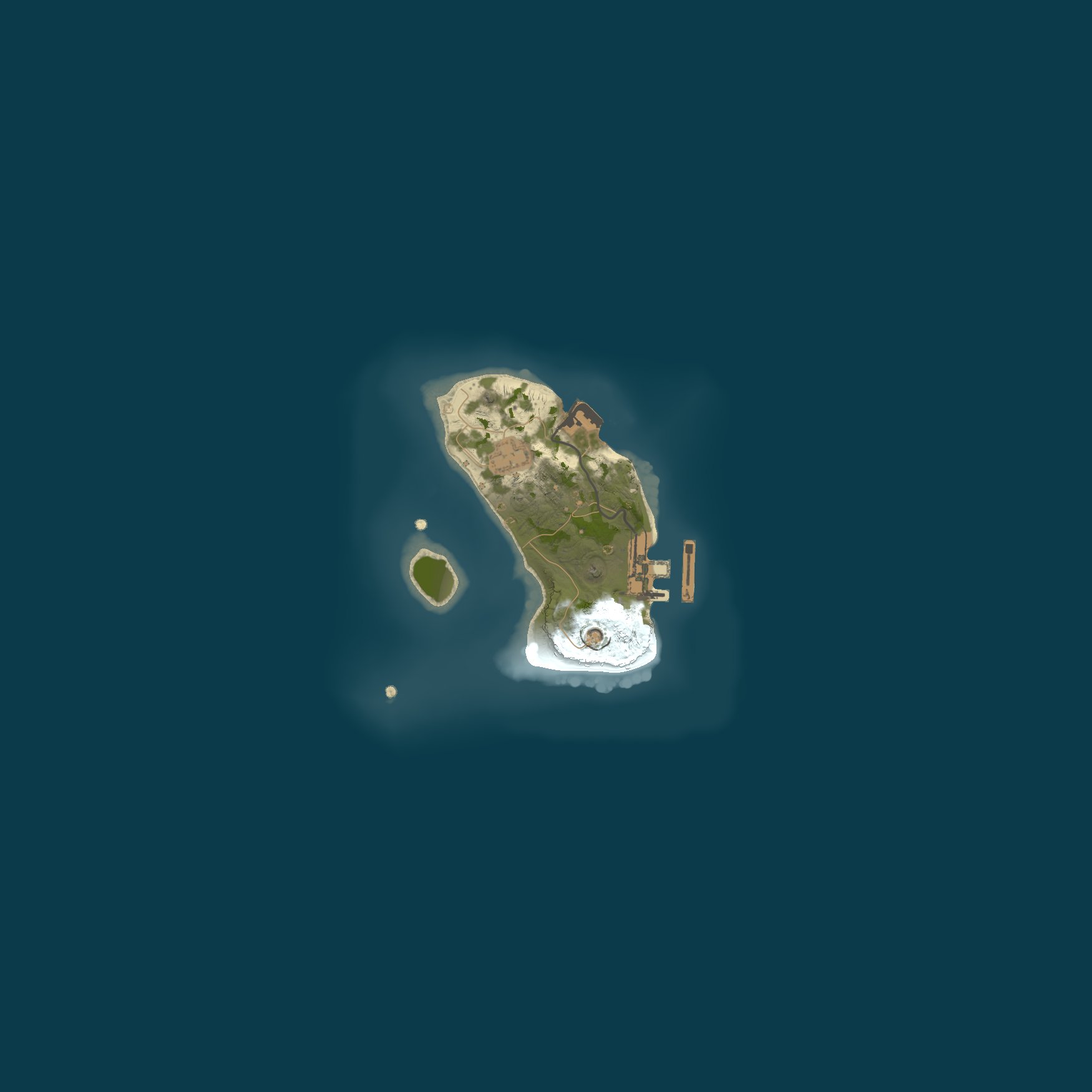
- Procedural Map · 1500
Similar servers
The same kind of game, then region, group limit, rate and wipes.
- 1Rustoria.co - EU East MediumEU · groups of 12+ · biweekly · 369 on average586 / 600
- 2Rustoria.co - EU East LongEU · groups of 12+ · monthly · 366 on average450 / 500
- 3Rusty Moose |EU Biweekly|EU · groups of 12+ · biweekly · 347 on average216 / 250
- 4Rusty Moose |US Biweekly|NA · groups of 12+ · biweekly · 345 on average151 / 200
- 5Rustoria.co - EU MediumEU · groups of 12+ · biweekly · 226 on average168 / 200
- 6Rustopia.gg - US MediumNA · groups of 12+ · biweekly · 225 on average139 / 200
Players
Every five minutes, from the Steam server list.
Hourly average and peak, UTC.
Daily average and peak, UTC.
Rank
daily · 1 is bestTop 70% of all ranked servers. Ranked on player hours over the last seven days.
Performance
48 hours: hourly readings. 30 to 90 days: a point a day, measured since 23 Oct. Low fps and a climbing entity count mean lag.
Wipe calendar
2 days with a wipe in the last 16 weeksNot enough wipes seen yet to tell. Every server wipes at the monthly force wipe.
- wipe-day peak
- 0 players, last three wipes
The first 48 hours of its last wipes
-
10 Nov
Tue 13:06 UTC peak 0 · running
-
5 Nov
Thu 19:00 UTC · force wipe – on before
- Address
- 51.38.155.213:28556
- Region
- –
- Max players
- 40
- Group limit
- 8, the default
- Wipe schedule
- –
- Last wipe
- 10 Nov 2026, 13:06 UTC
- Hostname
- –
- First seen
- 23 Oct 2026
Server tags
What each tag it publishes means. Published as mp40,ptrak,$r?,v2636,gmrust,cs170545,ts8.
gmrustGame mode Standard survival, as in Rust.mp40Max players The slot count is 40.ts8Group limit The game default applies: teams are limited to 8 players.v2636Protocol Your game must be on protocol 2636 to join.cs170545Build Build: 170545.ptrakNetworking The network layer is the game's standard, RakNet.$r?Region code Region code: not set.Flag meanings are Facepunch's.
Player data
What is the rank of A Shockbyte x Discord Production Rust Server?
The seven-day player hours rank for A Shockbyte x Discord Production Rust Server is #15,455, in the top 70% of ranked servers.
What is the player count on A Shockbyte x Discord Production Rust Server?
Currently offline, A Shockbyte x Discord Production Rust Server was last seen 10 days 8 hours ago.
Map and rules
What map is used on A Shockbyte x Discord Production Rust Server?
A Shockbyte x Discord Production Rust Server uses a procedural map of size 1,500 with seed 50000, generated by the game. Because size and seed determine the map, a RustMaps view is available from this page.
What settings and rules apply on A Shockbyte x Discord Production Rust Server?
The name of A Shockbyte x Discord Production Rust Server carries no gather rate. The game's default applies: no more than 8 players per group. It runs survival, the usual game: gathering, building and raiding. Raiding and player-versus-player fighting are enabled. The server browser lists it under Community. VAC by Valve is on.
Wipe details
What can you expect from wipe day on A Shockbyte x Discord Production Rust Server?
Across recent wipes, the busiest point averaged 0 players. The crowd on the latest wipe peaked 0 hours in.
On what schedule does A Shockbyte x Discord Production Rust Server wipe?
The record holds too few wipes from A Shockbyte x Discord Production Rust Server to show its rhythm. Each month brings a force wipe for all Rust servers. It falls next on Thursday 3 December at 19:00 UTC. The present world dates from 14 days 1 hours.
Tags and filters
How should you read the tags on A Shockbyte x Discord Production Rust Server?
gmrust (Game mode): Standard survival, as in Rust; mp40 (Max players): The slot count is 40; ts8 (Group limit): The game default applies: teams are limited to 8 players; v2636 (Protocol): Your game must be on protocol 2636 to join; cs170545 (Build): Build: 170545; ptrak (Networking): The network layer is the game's standard, RakNet; $r? (Region code): Region code: not set are the tags A Shockbyte x Discord Production Rust Server publishes; the game's server browser reads them. At the top of this page you will find its current players, its queue and the making of its world, all from the tags.
What lists and filters on Best Rust Servers hold A Shockbyte x Discord Production Rust Server?
The Best Rust Servers lists that A Shockbyte x Discord Production Rust Server fits are: Community servers, no training or build tags. Filter entries for this server: Type: Community (not modded, not official) and No plugins at all; Group limit: 5 or more.
Server details
What Rust version does A Shockbyte x Discord Production Rust Server run?
The Rust version on A Shockbyte x Discord Production Rust Server is network protocol 2636 and build 170545, running on Linux. To join, your game must use the same protocol; Steam handles the update for you.
What is the location of A Shockbyte x Discord Production Rust Server?
For A Shockbyte x Discord Production Rust Server, no region is published. Where a server says it is, that is what Best Rust Servers shows; it does not look up the machine's location. You can reach it at 51.38.155.213:28556.
How reliable is A Shockbyte x Discord Production Rust Server and is it online?
Down right now, A Shockbyte x Discord Production Rust Server was last seen 10 days 8 hours ago. In the last 7 full days, 0 of 168 hours were online, an uptime of 0%. Best Rust Servers recorded its first appearance on 23 October 2026.
How to join
What are the steps to join A Shockbyte x Discord Production Rust Server?
Enter client.connect 51.38.155.213:28556 in the console after pressing F1 in Rust. Or use Launch Rust on this page, which opens Rust via Steam and connects.