Solo Server
122.58.103.94:28082Up, checked 1m agoMonitored since 5 Nov 2026
Health checks
from the latest readings- ReachableOn the Steam server list, checked 1m agoPassing
- Capacity0% of 50 slots in usePassing
- Queuenobody waitingPassing
- Performancerunning at 237 fpsPassing
- Wipe rhythm5 new worlds this week: resets, not wipesWarning
- Next wipenot predictable yetNo data
Activity
players each hour, last 48- Group limit
- 8, the default
- Wipe schedule
- not published
- Map
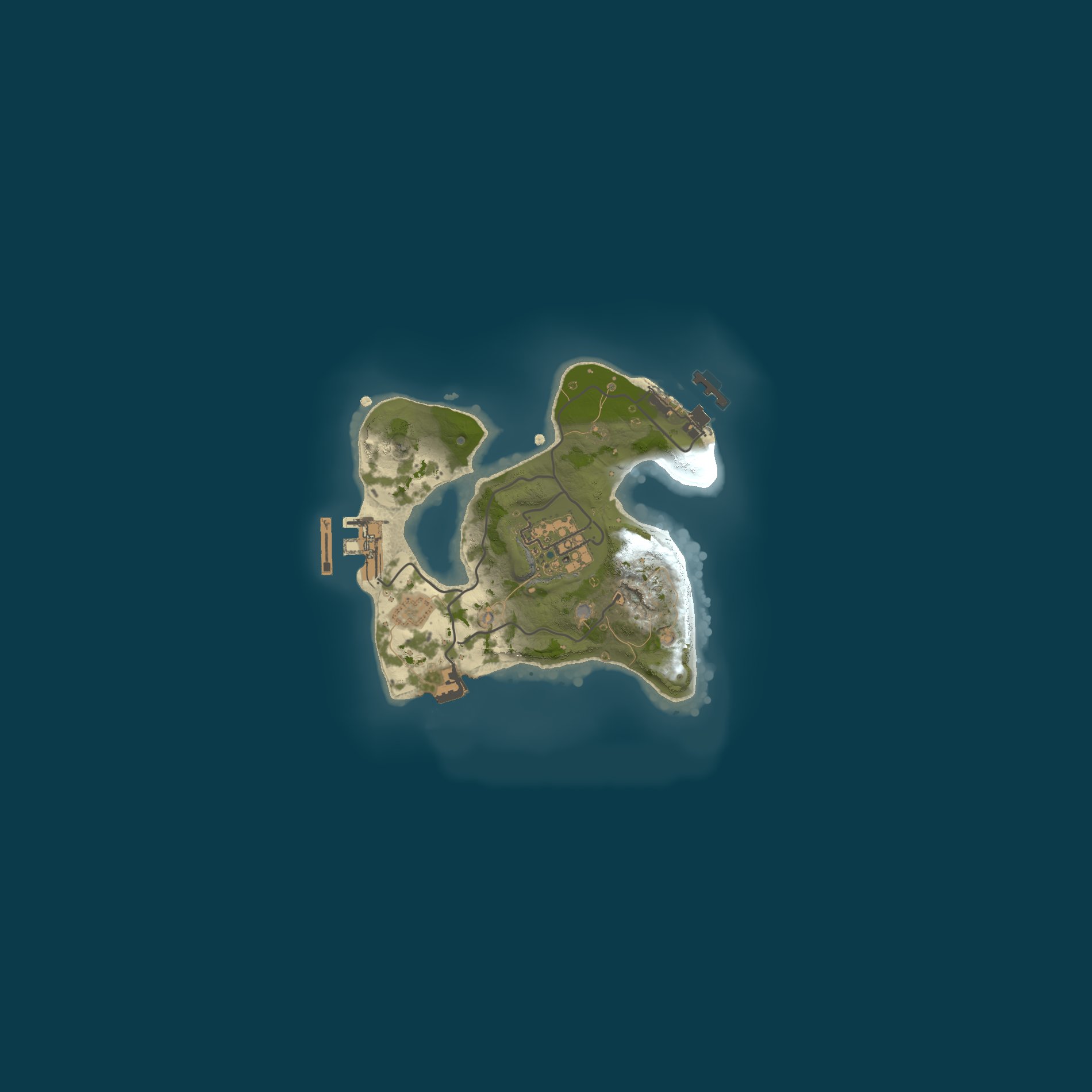
- Procedural Map · 1800
Similar servers
The same kind of game, then region, group limit, rate and wipes.
- 1Event Testinggroups of 200+ · 7 on average0 / ?
- 2MODO AZTECAgroups of 8+ · monthly · 4 on average1 / 40
- 3[RU] Новосибирск #FAST [MAX3] 24.11EU · groups of 8+ · weekly · 4 on average0 / 250
- 4RomasRustgroups of 8+ · 1 on average1 / 40
- 5404 RUST /ДЛЯ НОВИЧКОВ /МОСКОВСКИЙ 19.10EU · groups of 8+ · monthly · 1 on average1 / 300
- 6404 RUST /ДЛЯ НОВИЧКОВ /МОСКОВСКИЙ 19.10EU · groups of 8+ · monthly · 1 on average2 / 300
Players
Every five minutes, from the Steam server list.
Hourly average and peak, UTC.
Daily average and peak, UTC.
Rank
daily · 1 is bestTop 15% of all ranked servers. Ranked on player hours over the last seven days.
Performance
48 hours: hourly readings. 30 to 90 days: a point a day, measured since 5 Nov. Low fps and a climbing entity count mean lag.
New worlds
5 days with a reset in the last 16 weeks-
23 Nov
Mon 06:57 UTC 1 on before
-
23 Nov
Mon 06:46 UTC 0 on before
-
23 Nov
Mon 06:22 UTC 0 on before
-
18 Nov
Wed 07:06 UTC 0 on before
-
18 Nov
Wed 05:40 UTC peak 7 · lasted 5 days
-
17 Nov
Tue 04:26 UTC peak 7 · lasted 1.1 days
-
13 Nov
Fri 04:21 UTC 0 on before
-
13 Nov
Fri 04:07 UTC peak 7 · lasted 4 days
-
5 Nov
Thu 19:00 UTC · force wipe – on before
-
5 Nov
Thu 05:50 UTC peak 2 · lasted 7.9 days
- Address
- 122.58.103.94:28082
- Region
- –
- Max players
- 50
- Group limit
- 8, the default
- Wipe schedule
- –
- Last wipe
- resets constantly
- Hostname
- –
- First seen
- 5 Nov 2026
Server tags
What each tag it publishes means. Published as mp50,ptrak,$r?,v2636,gmrust,cs127130-304bb87291c,ts8,^o^z.
gmrustGame mode Standard survival, as in Rust.mp50Max players 50 player slots.ts8Group limit This is the game default: a maximum of 8 per team.v2636Protocol To join, your game needs to run protocol 2636.cs127130-304bb87291cBuild This server does not publish a build number.ptrakNetworking The network layer is RakNet, the game's standard.$r?Region code No region code is set.^oOxide The plugin framework Oxide (uMod) is installed.^zModded This server is listed as Modded, with plugins or settings that change the game.Flag meanings are Facepunch's.
Population
What is the rank of Solo Server?
The seven-day player hours rank for Solo Server is #3,194, in the top 15% of ranked servers.
What is the population of Solo Server?
At the moment, 0 of 50 slots on Solo Server are filled. The average over seven days is 1 players, peaking at 7. The busiest time in the last 48 hours was 08:00 UTC, with an average of 6 players.
Map and rules
Which map is active on Solo Server?
A procedural map of size 1,800 with seed 490817713 runs on Solo Server, produced by the game. Because size and seed determine the map, a RustMaps view is available from this page.
What are the settings and rules for Solo Server?
The name of Solo Server carries no gather rate. Group size follows the game default of 8 players. It runs survival, the usual game: gathering, building and raiding. Raiding and player-versus-player fighting are enabled. Plugins or settings change the game, and it is listed under Modded in the server browser. It runs these plugins: Oxide. VAC by Valve is on.
Wipe details
When does Solo Server wipe?
No wipe schedule is kept because Solo Server makes a new world every few hours. Those resets are not wipes.
Server tags
How should you read the tags on Solo Server?
These tags are published by Solo Server and read by the game's server browser: gmrust (Game mode): Standard survival, as in Rust; mp50 (Max players): 50 player slots; ts8 (Group limit): This is the game default: a maximum of 8 per team; v2636 (Protocol): To join, your game needs to run protocol 2636; cs127130-304bb87291c (Build): This server does not publish a build number; ptrak (Networking): The network layer is RakNet, the game's standard; $r? (Region code): No region code is set; ^o (Oxide): The plugin framework Oxide (uMod) is installed; ^z (Modded): This server is listed as Modded, with plugins or settings that change the game. The tags also carry its current players, its queue and when its world was made, all shown at the top of this page.
Where does Solo Server appear in Best Rust Servers lists and filters?
Included in these Best Rust Servers lists is Solo Server: Best modded Rust servers. You will find it on the server list under: Type: Modded; Server tag: Modded ^z and Oxide ^o; Group limit: 5 or more; Last wipe: In the last 3 days.
Server information
What is the Rust version on Solo Server?
Rust network protocol 2636 and build 127130 on Windows is what Solo Server runs. To join, your game must use the same protocol; Steam handles the update for you.
What is the location of Solo Server?
There is no published region for Solo Server. Where a server says it is, that is what Best Rust Servers shows; it does not look up the machine's location. 122.58.103.94:28082 is its address.
How smooth is Solo Server?
In the last 48 hours, the server averaged 238 fps, with a minimum of 232. The world contained up to 22,000 entities, such as buildings, deployables and other items. Memory peaked at 1,369 MB. Lag, as felt by players, is caused by low fps and an increasing number of entities.
What is the online status and reliability of Solo Server?
Solo Server is online at the moment. It reports an uptime that puts the last restart at around 10 hours ago. In the last 7 full days, 119 of 168 hours were online, an uptime of 71%. Best Rust Servers recorded its first appearance on 5 November 2026.
Join the server
How do you connect to Solo Server?
Enter client.connect 122.58.103.94:28082 in the console after pressing F1 in Rust. Or use Launch Rust on this page, which opens Rust via Steam and connects.