Local Test Server
2.134.73.108:28015Down, checked 3d agoMonitored since 13 Sep 2026
Health checks
from the latest readings- ReachableOn the Steam server list, checked 3d agoFailing
- Capacity0% of 15 slots in usePassing
- Queuenobody waitingPassing
- Performancehas not answered a direct queryNo data
- Fresh mapwiped 3d agoPassing
- Next wipetoo few wipes seen yetNo data
Activity
players each hour, last 48No hourly history yet.
- Group limit
- 8, the default
- Wipe schedule
- not published
- Map
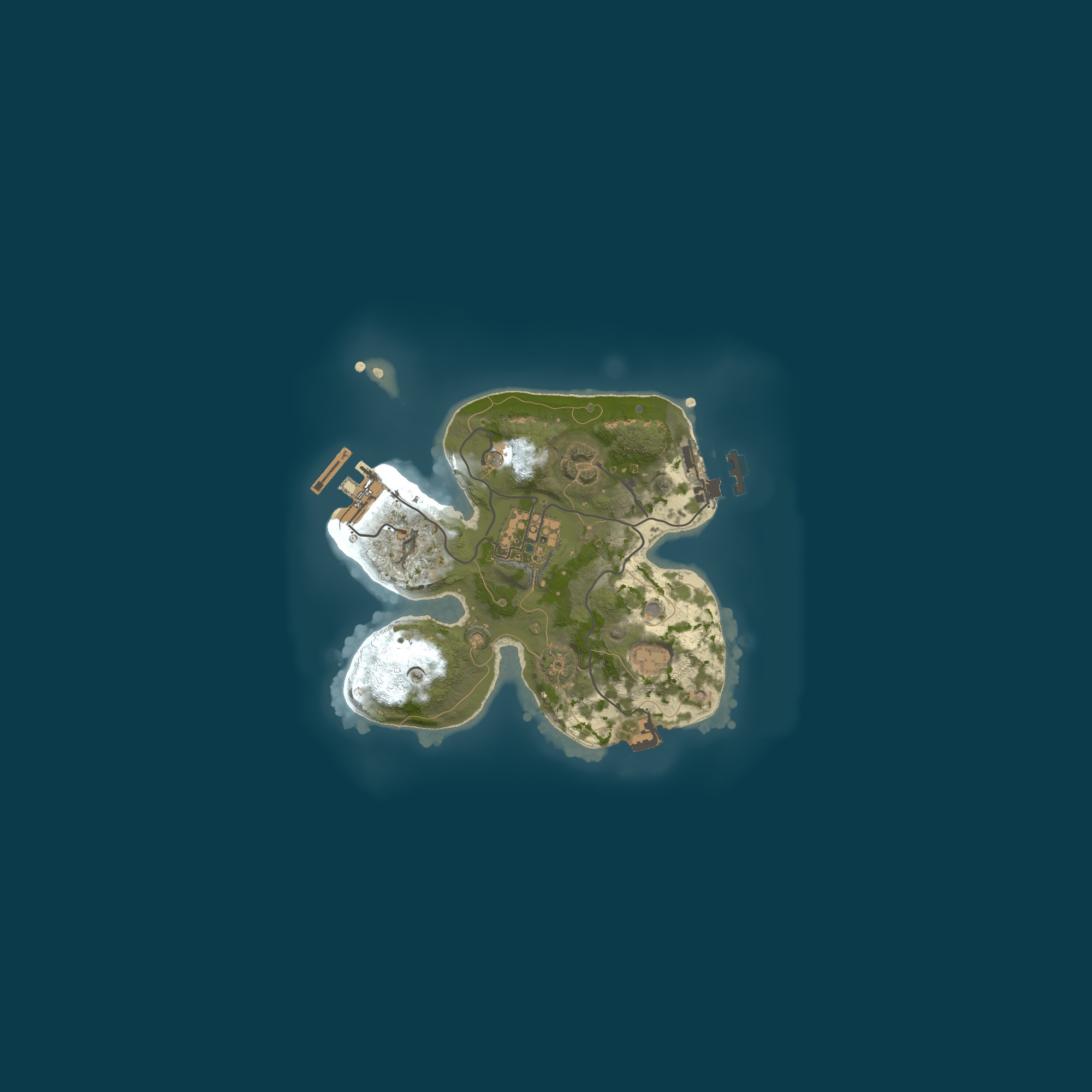
- Procedural Map · 2000
Similar servers
The same kind of game, then region, group limit, rate and wipes.
- 1Survivors.gg | 2 x Vanilla | Monthlygroups of 30+ · monthly · 198 on average36 / 200
- 2404 RUST 2Х|ДЛЯ НОВИЧКОВ|РОССИЙСКИЙ 07.10EU · groups of 16+ · monthly · 155 on average58 / 1000
- 3ShockRust | Blue | NoLimitno group limit · 130 on average28 / 300
- 4STEEL RUST /ДЛЯ НОВИЧКОВ /EU Monthly 07.10EU · groups of 24+ · monthly · 109 on average15 / 300
- 5RETRO RUST #1 Х1000|NOLIMIT|LOOT++|KIT WIPE 6.10EU · groups of 16+ · weekly · 109 on average27 / 225
- 6STEEL RUST /ДЛЯ НОВИЧКОВ /EU Main 06.10EU · groups of 24+ · monthly · 102 on average8 / 300
Players
Every five minutes, from the Steam server list.
Hourly average and peak, UTC.
Daily average and peak, UTC.
Rank
daily · 1 is bestTop 60% of all ranked servers. Ranked on player hours over the last seven days.
Performance
48 hours: hourly readings. 30 to 90 days: a point a day, measured since 17 Sep. Low fps and a climbing entity count mean lag.
Wipe calendar
2 days with a wipe in the last 16 weeksNot enough wipes seen yet to tell. Every server wipes at the monthly force wipe.
- usual gap
- 1.8 days between real wipes
- wipe-day peak
- 1 players, last three wipes
The first 48 hours of its last wipes
-
4 Oct
Sun 11:37 UTC peak 1 · running
-
2 Oct
Fri 17:24 UTC peak 1 · lasted 1.8 days
- Address
- 2.134.73.108:28015
- Region
- –
- Max players
- 15
- Group limit
- 8, the default
- Wipe schedule
- –
- Last wipe
- 4 Oct 2026, 11:37 UTC
- Hostname
- –
- First seen
- 13 Sep 2026
Server tags
What each tag it publishes means. Published as mp15,ptrak,$r?,v2634,gmrust,cs166586,ts8,^o^z.
gmrustGame mode Survival in the standard Rust style.mp15Max players The slot count is 15.ts8Group limit The game default applies: teams are limited to 8 players.v2634Protocol The game protocol is 2634; your game must match to join.cs166586Build Build: 166586.ptrakNetworking The network layer is the game's standard, RakNet.$r?Region code No region code is set.^oOxide The plugin framework Oxide (uMod) is installed.^zModded This server is listed as Modded, with plugins or settings that change the game.Flag meanings are Facepunch's.
Player data
What position does Local Test Server hold?
The seven-day player hours rank for Local Test Server is #14,292, in the top 60% of ranked servers.
How many players are on Local Test Server?
The server Local Test Server is offline at the moment, with its last sighting 3 days 13 hours ago. The average over seven days is 0 players, peaking at 1.
Map and rules
What is the map on Local Test Server?
A procedural map of size 2,000 with seed 12345 runs on Local Test Server, produced by the game. View it on RustMaps from here: identical size and seed yield the same map.
What settings and rules apply on Local Test Server?
The name of Local Test Server carries no gather rate. Group size follows the game default of 8 players. It runs survival, gather, build and raid: the standard game. You can fight other players and raid their bases. The server browser lists it as Modded: plugins or settings change gameplay. Its plugins include Oxide. The server has VAC, Valve's anti-cheat, active.
Wipe information
What happens on Local Test Server during wipe day?
On average, the peak across recent wipes was 1 players. Peak numbers on the latest wipe arrived 2 hours after it began.
On what schedule does Local Test Server wipe?
Too few wipes from Local Test Server are recorded to reveal a rhythm. The monthly force wipe applies to every Rust server. The next one is Thursday 5 November at 19:00 UTC. It has been 3 days 17 hours since the current world was made.
Tags and filters
How should you read the tags on Local Test Server?
gmrust (Game mode): Survival in the standard Rust style; mp15 (Max players): The slot count is 15; ts8 (Group limit): The game default applies: teams are limited to 8 players; v2634 (Protocol): The game protocol is 2634; your game must match to join; cs166586 (Build): Build: 166586; ptrak (Networking): The network layer is the game's standard, RakNet; $r? (Region code): No region code is set; ^o (Oxide): The plugin framework Oxide (uMod) is installed; ^z (Modded): This server is listed as Modded, with plugins or settings that change the game are the tags Local Test Server publishes; the game's server browser reads them. Shown at the top of this page are three more things from the tags: its players now, its queue and the time its world was made.
Where does Local Test Server appear in Best Rust Servers lists and filters?
The Best Rust Servers lists that Local Test Server fits are: Best modded Rust servers. Filter entries for this server: Type: Modded; Server tag: Modded ^z and Oxide ^o; Group limit: 5 or more; Last wipe: In the last week.
About the server
What is the Rust version on Local Test Server?
Rust network protocol 2634 and build 166586 on Windows is what Local Test Server runs. Your game needs the same protocol to connect, and Steam updates it automatically.
What is the location of the server Local Test Server?
No region is published by Local Test Server. Where a server says it is, that is what Best Rust Servers shows; it does not look up the machine's location. 2.134.73.108:28015 is its address.
What is the online status and reliability of Local Test Server?
Local Test Server is offline at the moment; the last sighting was 3 days 13 hours ago. In the last 7 full days, 6 of 168 hours were online, an uptime of 4%. The date Best Rust Servers first observed it is 13 September 2026.
Connection
How do you connect to Local Test Server?
Enter client.connect 2.134.73.108:28015 in the console after pressing F1 in Rust. Or use Launch Rust on this page, which opens Rust via Steam and connects.